
Voice Commands
This chapter is the complete reference for every Alexa command supported by My Media for Alexa. All commands begin with either "Alexa, open My Media" (to start a session) or "Alexa, ask My Media to..." (inline command).
Quick Start Commands
| Command | What Happens |
|---|---|
Alexa, open My Media | Starts playing your entire music library (or your default playlist if one is configured) |
Alexa, ask My Media what's playing | Alexa announces the current track and artist |
Alexa, pause | Pauses playback |
Alexa, resume | Resumes paused playback |
Alexa, next / Alexa, skip | Skips to the next track |
Alexa, previous | Goes back to the previous track |
Alexa, stop | Stops playback entirely |
Playing by Album
"Alexa, ask My Media to play the album Divide"
"Alexa, ask My Media to play the album Dark Side of the Moon by Pink Floyd"
"Alexa, ask My Media to play Abbey Road"
Tracks are played in disc-number then track-number order. Use the shuffle command to randomise.
Playing by Artist
"Alexa, ask My Media to play music by Michael Jackson"
"Alexa, ask My Media to play The Beatles"
"Alexa, ask My Media to play some Mozart"
Playing by Genre
"Alexa, ask My Media to play Classical music"
"Alexa, ask My Media to play some Jazz"
"Alexa, ask My Media to play Rock"
Genre queries are always shuffled — playing sequential genre results is not recommended because it would group tracks by album rather than mixing them up.
Playing by Song Title
"Alexa, ask My Media to play the song Something Just Like This"
"Alexa, ask My Media to play the track Bad by Michael Jackson"
"Alexa, ask My Media to play Bohemian Rhapsody"
Playing a Playlist
"Alexa, ask My Media to play my Best Music playlist"
"Alexa, ask My Media to play the Road Trip Mix playlist"
"Alexa, ask My Media to play Jazz Collection"
You can also play Watch Folder labels directly:
"Alexa, ask My Media to play My Jazz Folder"
(where "My Jazz Folder" is the label of a Watch Folder)
Audio Books
"Alexa, ask My Media to play the book The Hobbit"
"Alexa, ask My Media to resume The Hobbit"
"Alexa, ask My Media to restart The Hobbit"
My Media automatically bookmarks your position in audio books. Asking to "play" a book you've started before will resume from the bookmark.
Playback Controls
Shuffle
"Alexa, ask My Media to set shuffle on"
"Alexa, ask My Media to shuffle"
"Alexa, ask My Media to set shuffle off"
Loop / Repeat
"Alexa, ask My Media to set looping on"
"Alexa, ask My Media to loop"
"Alexa, ask My Media to set looping off"
Volume
Volume is controlled through standard Alexa commands (not specific to My Media):
"Alexa, volume up"
"Alexa, set the volume to 7"
Multi-Server Commands
If you have multiple My Media servers registered to your Amazon account:
"Alexa, ask My Media to switch servers"
Alexa will list the available servers. You can then say the name of the server you want to switch to.
Sharing / Invitations
If someone has shared their My Media server with you:
"Alexa, ask My Media to list my invitations"
Alexa will read out pending invitations and ask if you want to accept them.
How My Media Handles Voice Searches
My Media uses a multi-pass fuzzy search algorithm:
- Concatenated exact — tries joining terms ("Dark Side" → "DarkSide")
- Exact match — searches for the literal term
- Fuzzy match — Lucene fuzzy search with edit-distance tolerance
- Style swap — if no genre match, tries treating the query as an artist
This means My Media can handle:
- Alexa mishearing song titles (e.g. "divide" heard as "divide" ✓)
- Alternate spellings (e.g. "Gray" vs "Grey")
- Partial names (e.g. "Michael" might find "Michael Jackson")
If Alexa consistently misidentifies a search term, you can train the correct result using Overrides.
Dashboard Voice Command Suggestions
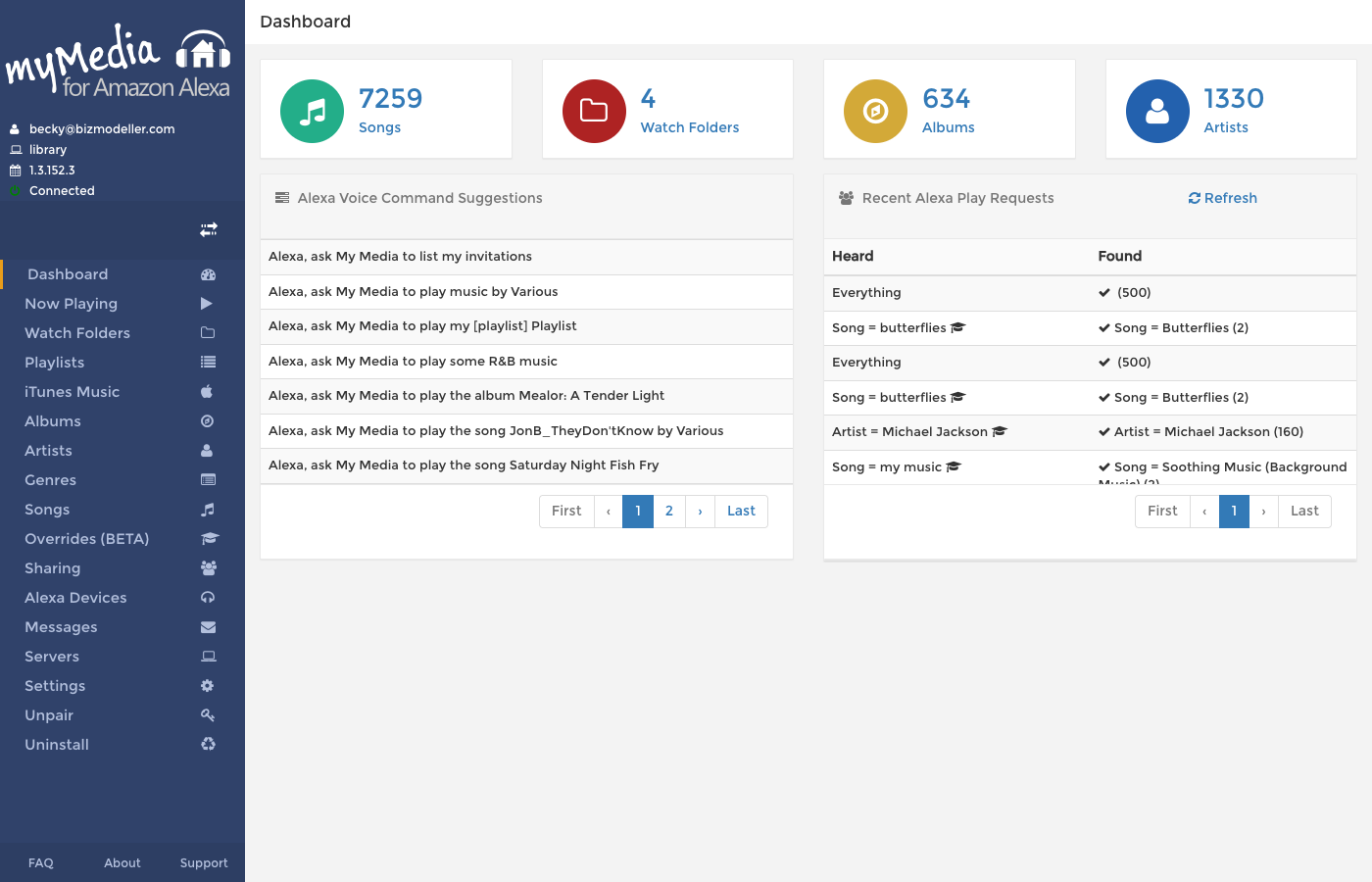
The Dashboard in the web console shows a table of Alexa Voice Command Suggestions — these are auto-generated from the actual album, artist, song and genre names in your library. They are ready-to-use commands you can try right now.
Recent Play Request History
The dashboard also shows a Recent Alexa Play Requests table that logs every request made through Alexa. Each entry shows:
- What Alexa heard (the search criteria)
- What My Media found (or didn't find)
- Whether an Override was used to match the result
This is extremely useful for diagnosing why Alexa isn't finding certain tracks.